The ACE COMBAT 8 callsign generator is an official browser quiz that asks five questions and reveals a themed pilot helmet and call sign. Complete the questions, read your result, and use the result screen's NEW CALL SIGN or SHARE action if you want another outcome or want to share the one you received. The quiz is a separate web activity: its result does not establish that your campaign character, platform profile, or online identity has been renamed.
You can use it to find a playful pilot persona before discussing the game with friends or entering an online community. The useful outcome is a completed result that you understand and can choose to keep. There is no reason to treat the questions as an aircraft build test or to search for a correct answer that will improve your performance in the game.
Find the official five-question quiz
Open the official ACE COMBAT 8 Callsign Generator. This publisher-hosted tool opens the five-question quiz directly; complete it in the browser, then return here if you need help interpreting the result.
Open the official ACE COMBAT 8 game website and look for Call Sign Generator in its additional game content. The quiz opens as a browser experience associated with WINGS OF THEVE. Its introductory instruction is to complete five questions to reveal your helmet and call sign. That instruction is a useful way to recognize the activity you are looking for.
Check the type of page before entering anything. A random military nickname tool, a generic aviation name generator, and this official ACE COMBAT 8 quiz are different activities. The official quiz starts with a numbered question screen and multiple answer choices. It does not require you to invent a nickname in a blank text box as the first step of the quiz shown here.
If you arrived through a search result, take a moment to confirm that you are on the publisher's game website. The relevant activity is a five-question personality-style experience, with a helmet and call sign as its result. A page that asks for a Steam product key or sends you to a game download is not a necessary part of this quiz workflow. Keep game activation and the browser activity separate.
Answer Question 1 and move through the sequence
Question 1 is labeled Flight Instinct and asks, “How do you get from point A to point B?” The four choices describe different ways of approaching a situation:
| Choice | The attitude expressed by the wording |
|---|---|
| High above the fight, waiting to strike | A patient, watchful approach |
| By the book — until the book stops working | An orderly approach that can adapt |
| I get lost, then make it everyone else’s problem. | A deliberately chaotic, humorous answer |
| Low and fast, where no one expects you | A direct approach based on surprise |
The right-hand column interprets the wording so that you can choose intentionally. It is not a description of hidden scoring weights or a guarantee that any one answer produces a particular result. Pick the option that fits the persona you want to express, then use Next to continue through the questions.
The screen identifies the current position in the five-question sequence. Use that progress indicator to distinguish an unfinished quiz from a completed result. After the first choice, continue answering the remaining questions rather than stopping as soon as you have selected a flying style. The stated workflow requires all five questions before the helmet and call sign are revealed.
Read the whole answer before selecting it. The quiz uses personality and humor, so one sentence can communicate more than a simple preference for speed or altitude. You can answer as yourself, as the kind of pilot you imagine being, or as a fictional persona you want to try. Those are different approaches to the same activity, and choosing one consistently makes the result easier to interpret.
Use the questions as a persona exercise
The questions are written around pilot instincts and reactions, rather than around measured performance in a live mission. Treat them as a set of character decisions. You are describing how your imagined pilot responds under pressure, works with a squad, or presents themselves after an engagement. That is a more useful way to read the quiz than assuming it evaluates your actual combat ability.
If you want a result that feels like you, answer with the response you would naturally choose. If you want a memorable community nickname, you can instead answer for a distinct persona. For example, you might imagine a calm teammate who keeps the group organized, or a low-flying pilot who prefers an unexpected approach. Decide which approach you are taking before comparing your result with someone else's.
Do not use the quiz to decide which aircraft you should buy or which weapon you should equip. A personality answer does not establish aircraft statistics, handling characteristics, or mission suitability. The practical choices inside ACE COMBAT 8 still depend on the current objective, available equipment, and your comfort with the controls. The quiz gives those discussions a theme, rather than replacing them.
Read the helmet and call sign on the result screen
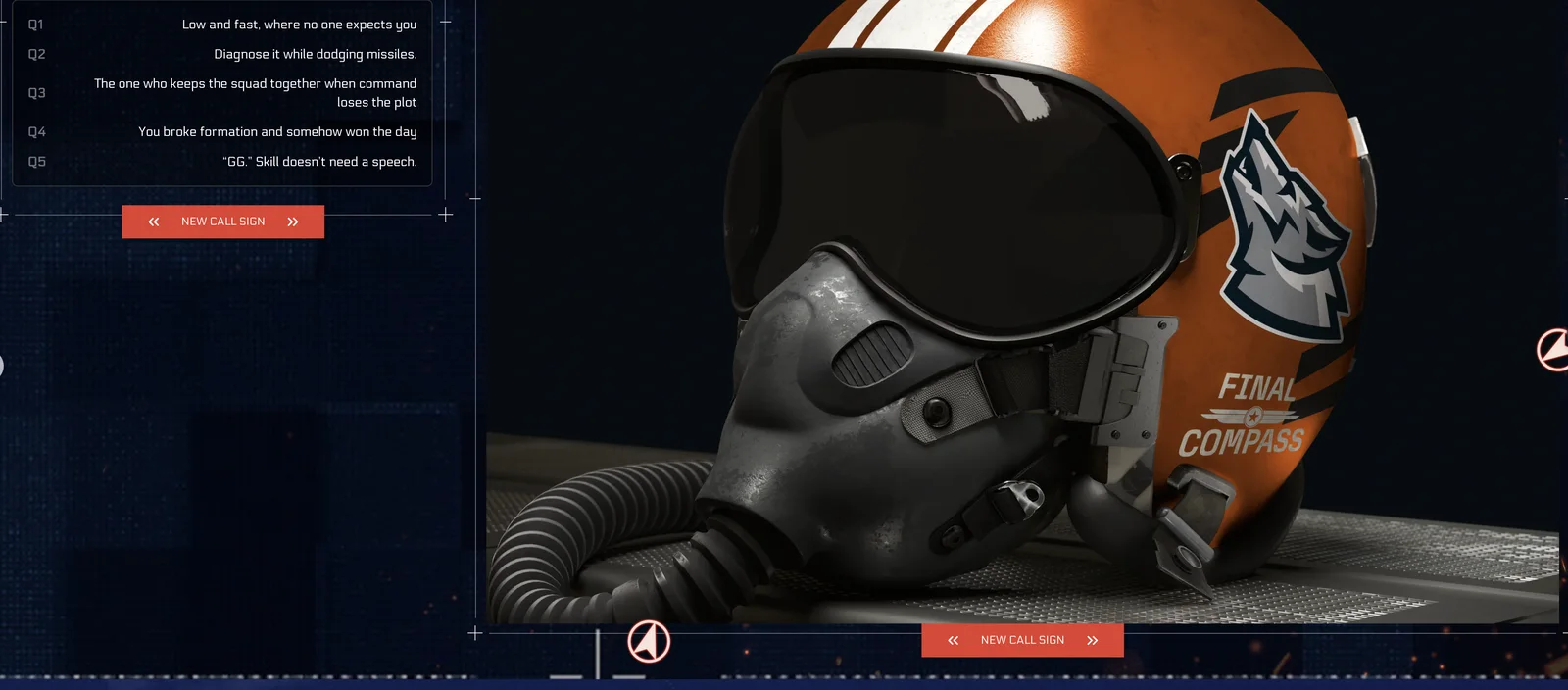
A completed FINAL COMPASS result with the selected answers and NEW CALL SIGN action.
A completed result presents a call sign alongside a helmet design. The example shown here is FINAL COMPASS. Its associated traits are PRECISE, STEALTH, and LOYAL. Read those words as part of the quiz's description of the resulting pilot persona. They are not demonstrated bonuses to weapon accuracy, detection behavior, or squad support inside the game.
The result screen also shows the five selected answers. That summary is useful because it connects the outcome to the choices you actually made. You can look back at the selections and decide whether the persona feels coherent. If the final call sign is appealing but the choices do not reflect how you intended to answer, you can use the new-result workflow to try again.
The helmet is a visual part of the web result. Keep the whole composition in mind when saving or discussing it: the call sign, design, and answers together explain the experience more clearly than a detached helmet image. A helmet layer by itself can omit the name or other elements that make the completed result recognizable.
Seeing a helmet in this browser result does not confirm that the same design has been granted as an inventory item. Likewise, the presence of a call sign does not demonstrate a connection to your console profile or Steam account. Use the web result for the purpose it visibly supports, and check the game's own menus separately if you want to change something in the game.
Understand the FINAL COMPASS example
The example result provides a concrete way to read a completed quiz without needing a catalogue of every possible outcome. Its selected answers form a pilot persona that combines an unexpected approach with practical problem solving and attention to the squad.
| Question | Selected answer in this example |
|---|---|
| Q1 | Low and fast, where no one expects you |
| Q2 | Diagnose it while dodging missiles. |
| Q3 | The one who keeps the squad together when command loses the plot |
| Q4 | You broke formation and somehow won the day |
| Q5 | “GG.” Skill doesn’t need a speech. |
The answers explain why a reader might associate this example with a restrained, adaptable teammate. That is an interpretation of the words on the screen. The quiz's exact calculation is not established by one example, so this page does not promise that copying these answers always produces the same helmet, trait combination, or call sign.
You also do not need to copy this example to complete the activity. Its purpose is to show what a finished result looks like and how the answer summary can help you read it. Your own selections are the relevant choices for your attempt. Comparing them with the example can be entertaining, but it is not a requirement for finding a valid result.
Try another call sign or share the current result
The completed screen includes NEW CALL SIGN and SHARE. Decide which outcome you want before choosing either action. If you like the current result, record the name and review the visible answer summary first. If you want to explore another persona, use NEW CALL SIGN and follow the next screen's instructions for another attempt.
When comparing attempts, change your answers deliberately. You might keep the overall persona consistent while changing one response, or answer the whole quiz as a different imagined pilot. That gives you a useful way to discuss differences between results. It still does not reveal a complete scoring formula, because a small number of attempts cannot establish every possible relationship between the questions and outcomes.
Use SHARE to inspect the sharing options presented by your browser and the quiz. Review what is being offered before sending it onward. The visible SHARE label alone does not establish that every browser will offer the same destination, export format, or download action. Follow the option actually shown in your session, and confirm that the result you intend to share is the one on screen.
If you share a screenshot instead, consider what else is visible around the quiz. A complete browser capture can include unrelated tabs, personal account information, or other content outside the result. Choose a capture that communicates the helmet and call sign clearly while keeping unrelated information out of the image. That is a practical preparation step for sharing, rather than a special requirement of ACE COMBAT 8.
Handle an incomplete or unresponsive browser session
If you can see a question but have not reached a helmet result, check your progress through the five-question sequence first. Select an answer and use the visible continuation control. An unfinished sequence is different from a finished result that you dislike, and restarting immediately can make you repeat choices you had already completed.
If an action appears unresponsive, note what is on screen before retrying. The current question number, selected answer, and presence or absence of a result help you describe the problem. A browser refresh can start a new session or lose unsaved progress, so make that decision with the current state in mind. This guide does not promise that partial answers survive a refresh or that results are stored across devices.
For a page that fails to display the quiz at all, ordinary browser checks are appropriate: confirm the page loaded, make sure required page scripts are allowed in your chosen browser, and try reopening the official activity. These are troubleshooting steps to isolate a web-page problem, not evidence that a particular extension or browser is the cause in every case. Avoid changing game installation files to repair a separate browser quiz.
Keep the web result and your game identity separate
The clearest completion check is simple: all five questions have been answered, a call sign and helmet are visible, and you understand the available result actions. You can then keep the result, try another persona, or share it through the options your session provides.
Treat the result as a themed introduction to your imagined pilot. If your actual goal is to customize an aircraft skin, change an emblem, manage a platform profile, or understand the campaign protagonist, use the relevant game feature or guide for that task. Completing this quiz does not establish those changes. Keeping the purpose clear lets you enjoy the result without expecting an account update or gameplay reward that the visible workflow has not confirmed.