
ACE COMBAT 8 uses Denuvo Anti-Tamper on Steam. The current store disclosure lists a machine activation limit of five different systems within a day. Steam also lists Easy Anti-Cheat separately as kernel-level anti-cheat. These notices describe different systems: the Denuvo entry concerns copy protection and activation, while the anti-cheat entry concerns protection of the multiplayer environment.
If you are deciding whether to buy the PC version, read those disclosures before choosing a seller. If you already own it and cannot launch, identify the actual failure before changing your installation. A redemption error, a machine activation message, an anti-cheat error, and a crash after loading the campaign require different checks. The presence of Denuvo alone does not diagnose all four.
Confirm the current PC disclosure
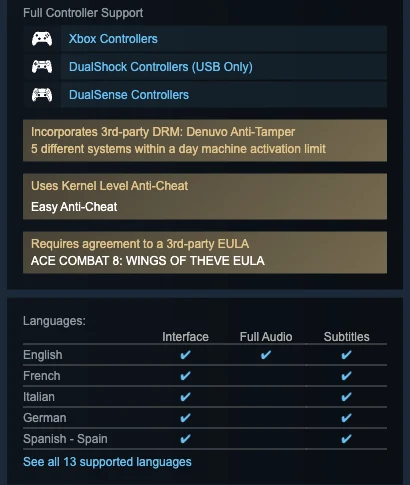
The DRM notice and anti-cheat notice are separate entries; the machine limit appears directly beneath Denuvo.
The strongest starting point is the current Steam listing for the game you intend to run. It identifies Denuvo Anti-Tamper by name and gives the daily different-system limit beside that notice. The nearby Easy Anti-Cheat notice is a separate disclosure. Read them as two entries rather than treating every third-party component as one unnamed restriction.
Older discussion threads can be misleading here. Before release, players debated whether the game would use Denuvo, whether the publisher had disclosed it, and what earlier games suggested. Those posts describe the information available when they were written. A post saying that no DRM is listed is not a better description of the present game than a current listing that explicitly names it.
Keep the platform in view as well. The Steam disclosure establishes information about the Steam PC product. It does not establish an identical five-system rule for PlayStation 5 or Xbox Series X|S. Console ownership and installation should be checked through the relevant console account and platform support instructions.
| Notice or failure | What it concerns | First useful check |
|---|---|---|
| Denuvo Anti-Tamper disclosure | PC copy protection and machine activation | Current Steam product details and the exact launch message |
| Easy Anti-Cheat disclosure | The separately listed anti-cheat component | Whether the error specifically names that component |
| Product-key redemption failure | Adding the purchased entitlement to an account | Key type, seller, platform, region, and redemption result |
| Missing aircraft or pass reward | Add-on ownership or in-game claim conditions | The purchased item and its mode or season requirements |
| Crash during gameplay | A runtime failure after the game has started | Crash timing, system configuration, and repeatable conditions |
Read the five-system limit accurately
The wording counts different systems, not five ordinary starts of the game. Launching the installed game again on the same PC should not be described as spending a fresh one-machine allowance solely because you pressed Play again. Likewise, the disclosure is not a five-copy purchase limit or a rule that you can finish only five missions each day.
The daily wording matters if you are preparing several computers or testing multiple system configurations. The store notice does not explain exactly how the software identifies a different system. Do not assume that every hardware replacement, driver update, Windows reinstall, virtual machine, or operating-system switch will be treated identically. An undocumented identification rule should not become a precise troubleshooting promise.
Before making a series of installation changes, record which systems you have already used and when. If the game presents a machine activation limit message, stop treating that as an ordinary missing-file error. Follow the information in the message and seek support when its timing or account instructions are unclear. Reinstalling repeatedly is not proof that the daily limit has been reset.
Do not invent a reset clock. The listing says within a day, but that does not supply a local-midnight guarantee, a particular time zone, or an exact remaining countdown for your account. A useful support request includes the message and launch times. It should not begin with an assumed reset hour taken from another game.
Separate key redemption from game activation
A Steam key is used to add a product entitlement to a Steam account. The Denuvo disclosure describes an additional PC protection system associated with running the game. An error during code redemption therefore deserves a key investigation first. It does not automatically mean that your computer has reached a Denuvo machine limit.
Check what the code actually grants. A base-game key, a Deluxe-content code, and a preorder-bonus code can refer to different entitlements. Owning an add-on is not the same as owning the base game. A seller’s description and your account’s ownership record help identify that distinction before you attempt a fresh installation.
Use the purchasing account and match the code’s documented platform and regional restrictions. If a code has already been used, is invalid, or does not match the advertised product, preserve the redemption result and order record for the seller. Do not post the full key publicly while asking for help. A support team can request the required purchase details through its normal private channel.
Once Steam shows the base game in the intended account, continue to the launch problem. This order prevents an entitlement issue from being mixed with a runtime issue. It also avoids buying another copy merely because a bonus code or an add-on behaves differently from the main game.
Check the launch message before changing anything
Start with the exact point where the failure occurs. Does Steam reject the code? Does Play return immediately without a window? Does a protection component display a message? Does the game reach its menu but fail when you enter Online? Does the campaign load and then crash during a sortie? These observations are more informative than describing all failures as Denuvo problems.
Save the wording and any displayed identifier. Record whether the issue began after a system change, a game update, an account switch, or a move to another PC. This does not prove that the change caused the failure, but it gives support a useful sequence to investigate. Keep a distinction between what happened and what you suspect.
For a launch check, use an unchanged official installation and the account that owns the game. Confirm that Steam is running normally and that your system has a working connection when the launch or activation message requires one. If the message explicitly identifies a different-system limit, preserve it before attempting additional launches on other installations.
If the error is a crash with no activation message, move toward ordinary PC diagnosis. Compare your system with the current requirements, note your graphics driver and game build, and use the platform’s normal file-check options where appropriate. These are checks for installation or runtime conditions; they do not prove that Denuvo has been removed or repaired.
Understand what is known about offline play
A single-player campaign does not, by itself, establish that the Steam version can remain offline indefinitely. Multiplayer requires a connection, but the distinction between Campaign and Online is not a complete description of PC activation behavior. The store’s Denuvo disclosure should remain part of your planning even if you intend to play only the campaign.
The available disclosure does not provide a guaranteed offline interval or a schedule for any renewed verification. Avoid relying on a specific number of offline days taken from another Denuvo game. Differences between games, builds, accounts, and installation states make that kind of borrowed promise unreliable.
If you plan to travel without a dependable connection, check current publisher guidance and establish that your existing installation starts before departure. Preserve your normal account and installation state rather than introducing unnecessary system changes immediately before going offline. A successful test demonstrates that the installation worked in the tested circumstances; it does not establish permanent offline access.
Do not confuse a cloud-save sync notification with a protection error. Note which component names the problem, whether you can reach the menu, and whether the issue appears only when selecting Online. That information helps separate an unavailable network service from an activation failure that prevents the game itself from starting.
Denuvo and Easy Anti-Cheat are separate questions
Steam names Easy Anti-Cheat in the anti-cheat section and identifies its kernel-level operation. Denuvo appears in the third-party DRM section. Keeping those labels separate matters when reading system prompts, launch failures, and support discussions. A player saying anti-cheat failed has not necessarily reported a Denuvo activation problem.
If a message explicitly names Easy Anti-Cheat, investigate that component through the game’s supported installation and support instructions. Do not assume that removing it is a supported way to run the game, or that removing another component will solve an Online connection problem. The store disclosures are descriptions of included components, not a list of optional switches.
Similarly, a failed Online matchmaking attempt is not proof that PC activation has failed. If the campaign and menus work, record the Online error and the mode you selected. Keep server status, account access, and local launch conditions separate until there is evidence connecting them.
This page explains the listed DRM conditions. Detailed crash, performance, and Online-error troubleshooting belong to their respective guides because those problems require different evidence. You will reach a better diagnosis by following the component and failure stage actually shown on your screen.
Evaluate performance claims without assuming a cause
The fact that the game includes Denuvo establishes its presence. It does not establish a particular frame-rate penalty, loading-time increase, or stutter pattern on your PC. A demanding game can also be limited by graphics settings, hardware capabilities, storage, memory pressure, drivers, and scene complexity. An individual poor result does not identify which factor was responsible.
A meaningful comparison needs equivalent test conditions and a way to distinguish the software change being investigated. Comparisons between unrelated games or between different PCs cannot isolate Denuvo’s contribution. A video title, an opinion about another release, or a forum complaint is not a controlled AC8 measurement.
For practical diagnosis, record the scene, resolution, settings, driver version, and whether the slowdown repeats. Distinguish a crash before the main menu from a frame-rate drop during an effects-heavy fight. The first calls for launch evidence; the second calls for performance evidence. Neither should be relabeled automatically because a DRM notice exists.
There is also no confirmed removal date in the current disclosure. Some publishers have changed protection software in other games, but that history does not supply an ACE COMBAT 8 schedule. If this condition affects your purchase decision, use the current listing and wait for a specific publisher announcement rather than treating speculation as a promised update.
Prepare a support report that can be acted on
Include the game title, Steam account ownership status, purchase source, exact error, and the point where launch stops. Add the date and approximate time, the game build if available, and any recent move to another system. For a possible daily machine limit, describe the different installations you used without claiming an undocumented reset rule.
Keep private information private. A public screenshot should not expose your full product key, payment record, account recovery information, or unrelated personal details. Retain the complete order record for the appropriate support channel, but a public discussion normally needs only the problem description and non-sensitive context.
After changing one supported condition, test the same launch path again and record the result. If the problem changes from a redemption error to a successful ownership record but a new launch message remains, treat that as progress between two different issues. Clear observations make it easier to decide whether to contact the seller, Steam support, or the game’s publisher.