
An Ace Combat 8 key is useful only when its platform, edition, and activation territory match the account on which you intend to play. For a PC purchase, confirm that the listing is for ACE COMBAT 8: WINGS OF THEVE on Steam, includes the base game, and explicitly supports your region. A cheaper listing for an add-on, a different platform, or another edition does not provide an interchangeable license.
The game is available now. Treat early-access advertising and pre-order language separately from the contents promised by the seller today. Buying a Deluxe key after launch does not turn the purchase into a pre-order, and a code that activates correctly is not proof that every advertised bonus is included.
Identify what the code actually purchases
Start with the full product name. The important words are the game number and WINGS OF THEVE. This prevents a comparison between the current game and a previous Ace Combat title, an aircraft add-on, or an item whose name includes Ace Combat without containing the complete game.
Next, read the delivery description. A product sold as a key should identify where that key is redeemed. Do not substitute your own assumption because the listing includes PC in its title. PC describes the hardware family; Steam identifies the account and library in which the purchase belongs. Similarly, a PlayStation or Xbox listing is a different purchase from the Steam version.
Check whether the item grants the base game or requires it. The current game has separately listed content, including the playable F-14A and the Customizable Cosmetic Set. An attractive price beside one of those product names should not be compared directly with the price of the full game. Read the included-content list before evaluating the discount.
| Detail to confirm | What you need to establish |
|---|---|
| Full title | ACE COMBAT 8: WINGS OF THEVE |
| Platform | The platform on which your intended account plays |
| Activation service | Steam for a Steam PC key |
| Edition | Standard, Deluxe, or the exact package promised |
| Included game | The base game, rather than an add-on alone |
| Territory | Your account's region appears within the seller's stated activation coverage |
| Delivery | The seller is providing the product and delivery method you expect |
These checks belong together. Correct title and correct edition do not compensate for the wrong platform, just as the right platform does not compensate for an unsupported territory.
Read region wording before paying
A region statement applies to the particular offer you are buying. Do not assume that every key for the same game has identical activation coverage. A retailer may display a message such as “Activates in your region,” but that statement must be read in the context of the selected product, country, and account information.
Look for an explicit country list or an activation restriction attached to the offer. If the listing uses a broad territory label without defining the included countries, resolve that uncertainty with the seller before purchase. The word global on its own is less useful than an unambiguous answer about the country in which you will redeem the product.
Keep the location shown during checkout consistent with the location for which you need an activation guarantee. If a region checker changes after selecting a country or another product variant, use the result for the variant you actually put in the cart. A favorable message on a different listing is not a confirmation for the current one.
Also distinguish activation coverage from language support. Steam lists supported interface, subtitle, and audio languages separately. Being able to read or listen to the game in a language does not establish that a particular seller's key can be activated in every country where that language is spoken.
Do not buy first and plan to solve a regional mismatch later. The useful outcome is a license that works with your existing account under the stated terms. If the seller cannot confirm the territory, choose an offer that clearly supports it instead of treating an unexplained restriction as a minor inconvenience.
Match the edition to the entitlements you want
A Standard purchase is the straightforward choice when you want the base game. A Deluxe purchase adds the Customizable Cosmetic Set and a Premium Ace Pass Plus voucher. That distinction matters when checking a delivered code: the base game's presence is the first check, while the additional entitlements are a separate check.
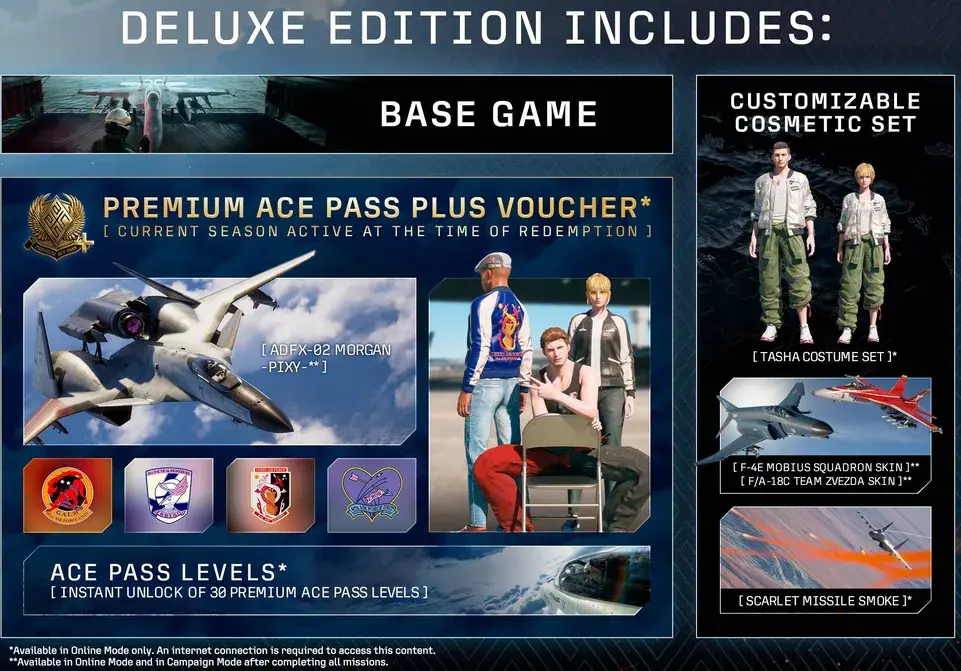
Use the edition contents to distinguish a full-game purchase from its additional digital entitlements.
A Premium Ace Pass Plus voucher is not the same thing as an unrestricted collection of every future season. The voucher redeems one season, with the active season at redemption determining the content obtained. If seasonal rewards are part of your reason for choosing a key, read the current entitlement wording rather than relying on the general Deluxe label alone.
Some cosmetics also have mode restrictions. The Tasha costume and Scarlet missile smoke are Online content. The included aircraft skins are available in Online and in Campaign after all campaign missions have been completed. Seeing an included skin unavailable early in Campaign therefore does not, by itself, prove that the wrong edition was delivered.
Keep edition checking narrow: identify the promised package and verify that it was supplied. If you already own the correct package but cannot claim its voucher, use the dedicated Premium Ace Pass troubleshooting guide. Buying another key before checking the existing entitlement can turn a menu or redemption problem into an unnecessary second purchase.
Separate current purchases from pre-order bonuses
The original pre-order offer included the F-14A and access to the ported ACE COMBAT ZERO: THE BELKAN WAR. A post-launch listing that still displays old pre-order artwork needs closer inspection. Ask what the actual key includes today; do not infer an entitlement from promotional artwork created before release.
Early access is another distinct condition. The launch period has passed, so an old reference to three days of early access does not give a current buyer an additional playable period. Evaluate the permanent content in the offer and any clearly stated surviving bonus, rather than assigning value to a date-sensitive benefit that can no longer be used.
A seller may list bonus content separately from the base-game key. In that situation, record exactly which products and codes are being delivered. Avoid treating one successfully redeemed code as proof that all parts of an order have arrived. Conversely, do not assume a missing bonus means the base-game activation failed when the game is already present in your library.
Prepare for redemption
Before using a code, make sure you are signed into the account intended to own the purchase. Keep the order receipt, product description, edition name, and territory confirmation together. That gives you a clear record if the delivered product differs from the order.
Follow the redemption instructions supplied with that specific offer. A Steam game key belongs in Steam's game-product activation flow; a wallet code, platform-specific voucher, or in-game entitlement may have a different purpose. Do not guess that every string of characters associated with the game can be entered in the same place.
Read the product identified during redemption before completing the action whenever that information is displayed. Match the result against the purchased title and package. If the displayed product does not match your order, stop and clarify the discrepancy rather than hoping that the remaining content will appear automatically afterward.
After redemption, check the library and the associated product information. Confirm that the base game is present, then examine any included add-ons or vouchers promised with the package. Save the confirmation with your receipt. This keeps the sequence simple: purchase description, redemption result, and library ownership should all describe the same product.
Distinguish a key error from a launch error
A code that cannot be redeemed and a game that cannot start are different problems. If activation rejects the code, preserve the exact message and compare it with the platform, region, and product type stated by the seller. If the game is already in the correct library, repeating activation is unlikely to explain a later crash or missing menu item.
The Steam version currently lists Denuvo Anti-Tamper and a five-different-systems-within-a-day machine activation limit. That is a separate software activation condition from buying or redeeming a key. It does not mean that one key grants five separate Steam purchases or that you should test a questionable code across multiple accounts.
PC compatibility is another separate check. The current PC requirements specify Windows 11, an SSD, hardware ray-tracing support, and DirectX 12 with Shader Model 6.6 or higher. A valid Steam license does not change those requirements. If the license is present but launch fails, investigate the installation and supported environment using the PC troubleshooting pages.
Resolve a delivery mismatch with useful evidence
When contacting the seller about a key, describe the mismatch precisely. Include the order number, purchased product and edition, promised activation platform, selected region, and the exact redemption message. If the issue is missing content after successful activation, identify the particular content rather than saying only that the key does not work.
Keep codes and account credentials out of public screenshots. A support case should contain enough information to investigate the purchase without exposing your account or unused entitlements to other people. Follow the seller's support channel for any sensitive verification it requests.
Do not replace evidence with repeated purchase attempts. One clear record of the original offer and the observed result is more useful than several orders placed to see whether another code behaves differently. Once the correct title, platform, territory, and package are confirmed in your account, you have completed the key-related task; any remaining gameplay unlock or seasonal redemption issue can be addressed in its own guide.