The ACE COMBAT 8 pre-order bonus included two items: the playable F-14A aircraft and ACE COMBAT ZERO: THE BELKAN WAR, delivered as a port of the original 2006 game. An internet connection is required to access the bonus content.
ACE COMBAT 8: WINGS OF THEVE has already launched, so a new purchase does not automatically include these items. The relevant question is whether you placed a qualifying pre-order through your platform store or a participating retailer before that seller’s launch cutoff. Buying the Deluxe Edition after release does not, by itself, create pre-order entitlement.
If you qualified but cannot find one or both items, do not buy another copy immediately. First confirm the order date, retailer offer, account, platform, code delivery method, and installed add-ons. Physical orders may require a separate retailer-issued pre-order code even when another code for Deluxe content was included in the box.
What the ACE COMBAT 8 pre-order bonus included
The bonus was attached to qualifying pre-orders rather than exclusively to the more expensive editions. A qualifying Standard Edition pre-order could receive the same two pre-order items as a qualifying Deluxe or collector-pack order.
| Bonus item | Confirmed description | Important limitation |
|---|---|---|
| F-14A | A playable aircraft for ACE COMBAT 8 | It is the F-14A, not the F-14D already represented elsewhere in the aircraft roster |
| ACE COMBAT ZERO: THE BELKAN WAR | A port of the original game released in 2006 | It was presented as a bonus, not as a remaster, and requires an internet connection to access |
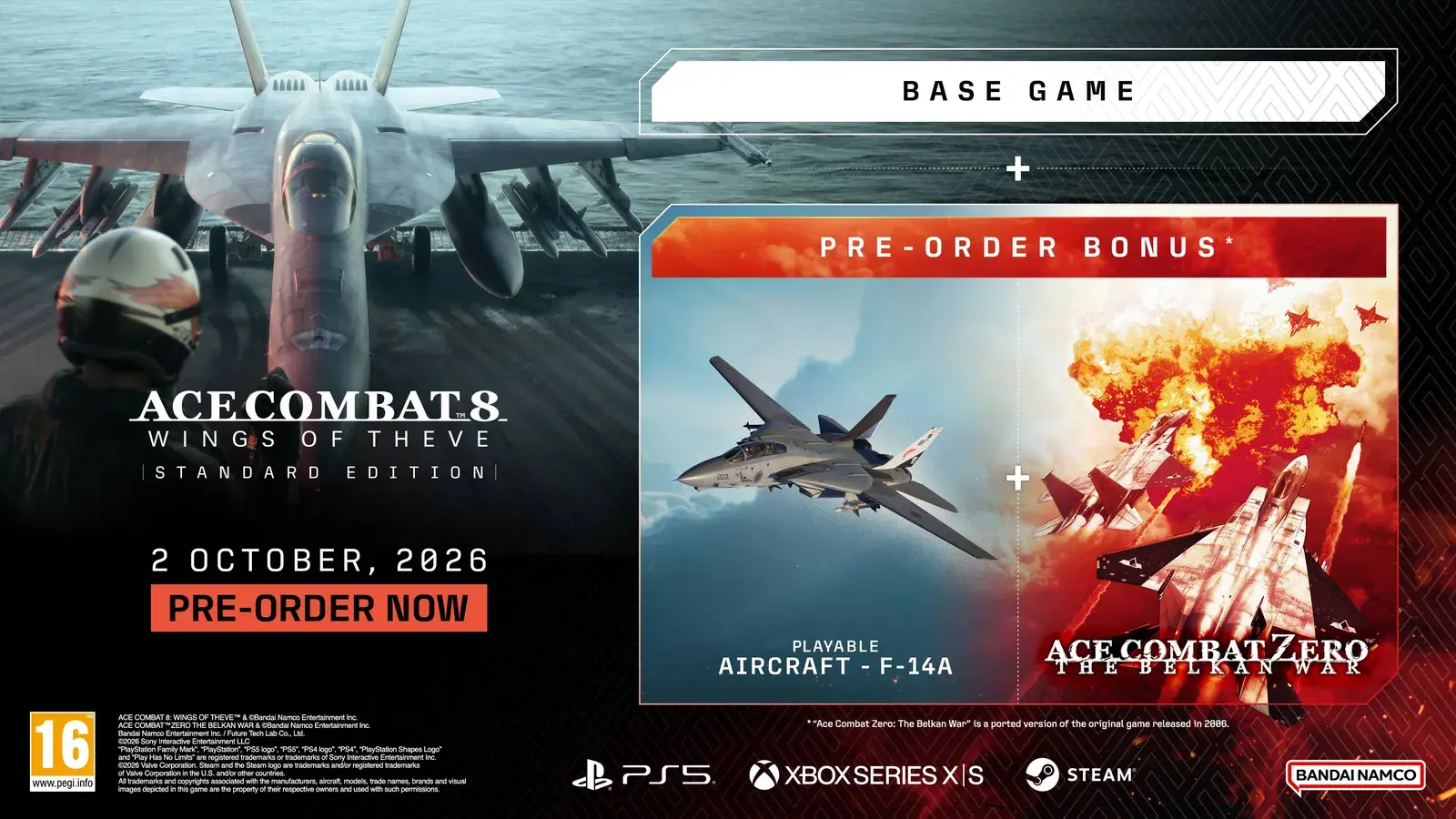
The original Standard Edition preorder promotion paired the playable F-14A with ACE COMBAT ZERO: THE BELKAN WAR; this historical offer is not proof of current eligibility.
The F-14A and ACE COMBAT ZERO were a pair. If your storefront or retailer advertised the ACE COMBAT 8 pre-order pack, both items should be part of that advertised entitlement. However, they may not be delivered through the same code as the base game or Deluxe content.
Do not confuse this pair with three-day early access. Early access applied to qualifying digital Deluxe pre-orders and ended when the game launched. It was not an extra item that can still be activated now.
How eligibility worked
Use the purchase record rather than the edition name to determine eligibility. The order date and the offer displayed by the seller are stronger evidence than the artwork currently shown on a post-launch store page.
| Purchase situation | What it normally means | What to verify |
|---|---|---|
| Digital pre-order placed before the platform cutoff | The pre-order pack should be tied to the purchasing account | Transaction date, correct account, add-on ownership, and download status |
| Physical pre-order from a retailer that advertised the bonus | A retailer-issued code should normally have been provided | Product listing, receipt, email, retailer messages, and any separate inserts |
| Purchase completed after launch | No automatic pre-order entitlement | Whether the seller explicitly included an unused bonus code |
| Physical order from a retailer that never advertised the bonus | Eligibility is not established by owning the game alone | Archived listing, order confirmation, or written retailer promotion |
| Used or second-hand copy | The bonus cannot be assumed to transfer | Whether an unused, compatible code was explicitly included |
Regional availability and retailer participation can differ. A general announcement that every edition could qualify does not prove that every shop in every country distributed codes in the same way. For a disputed physical order, preserve the exact listing shown when you ordered.
Standard, Deluxe, and pre-order status
“Deluxe” and “pre-order” describe different things. Deluxe is an edition with its own ongoing content, while pre-order status depended on when and where the order was placed. Standard buyers did not need to upgrade merely to qualify for the F-14A and ACE COMBAT ZERO.
Conversely, a post-launch Deluxe purchase should not be treated as proof that the historical pre-order pack is included. For the Deluxe voucher, cosmetics, and their mode restrictions, see the ACE COMBAT 8 Deluxe Edition guide.
First checks for a missing bonus
Work through these checks in order so that you can identify whether the problem is delivery, redemption, account ownership, installation, or eligibility.
- Confirm the order timestamp. Use the completed order or payment record, not a shipping date or the day the parcel arrived.
- Confirm the seller advertised the bonus. Save a screenshot or archived copy showing the F-14A and ACE COMBAT ZERO offer for your edition, platform, and region.
- Check every delivery channel. Search email, spam, receipts, retailer-account messages, digital-library notifications, box inserts, and separate code cards.
- Identify each code before redeeming it. A Deluxe-content code may be valid while still excluding the separate pre-order pack.
- Verify the destination account. Check the platform account that bought or redeemed the content, especially on a console shared by multiple users.
- Inspect owned add-ons and downloads. A successful redemption does not always mean every item installed automatically.
Keep screenshots of any successful redemption message and the ownership page afterward. If the content remains absent, those images distinguish a missing installation from a missing entitlement.
Digital pre-orders on Steam, PlayStation, and Xbox
For a digital pre-order made directly through a platform store, begin with the purchasing account’s transaction history. Confirm that the order was completed during the preorder window and that you are signed into the same account now.
Next, open the game’s add-on or downloadable-content management screen. Look for the pre-order pack, the F-14A, and ACE COMBAT ZERO by name. Install or enable any owned item that is not currently downloaded. Then restart the platform client or console before checking again.
If the store shows the content as owned but the game does not recognize it, use the platform’s normal license-refresh or content-restoration option where available. This is a troubleshooting step, not a guaranteed fix. Do not unlink accounts, erase saves, or repurchase the game merely to refresh ownership.
ACE COMBAT ZERO’s exact library presentation should not be assumed from the way ACE COMBAT 8 itself launches. Search the platform library, owned products, add-ons, and the result shown after redemption. Failure to find it inside an ACE COMBAT 8 menu alone does not establish that the entitlement is missing.
Physical copies and retailer-issued codes
Physical pre-orders require an extra distinction: the disc proves ownership of the base game, but it does not prove that a pre-order code was delivered. The code may appear on a receipt, in a retailer email, in the retailer account’s message area, or on a separate insert.
Some physical Deluxe buyers received Deluxe content and the pre-order pack as separate entitlements. If one code unlocks Deluxe items but neither the F-14A nor ACE COMBAT ZERO appears, do not assume that code was supposed to contain everything. Ask the retailer specifically for the ACE COMBAT 8 pre-order pack, naming both missing items.
When contacting the retailer, provide the order number, order date, platform, region, edition, receipt, and a copy of the listing that advertised the bonus. State whether you received no code, received only a Deluxe code, received an invalid code, or successfully redeemed a code but still lack the content. These are different failures and may be handled by different teams.
A replacement code is not guaranteed. Retailers and regional support teams may follow different procedures, so retain written replies and avoid closing the case until you have verified any proposed resolution.
Redeemed codes with content still missing
A platform accepting the code narrows the problem but does not prove that everything has installed. Record the redemption confirmation, then check the account’s purchase history and owned add-ons.
Use this sequence:
- Confirm that the redeemed product name refers to the pre-order pack rather than only Deluxe content.
- Check whether the F-14A or ACE COMBAT ZERO has a separate download, install, or enable action.
- Restart the storefront client or console after installation.
- On consoles, refresh licenses or restore purchased content through the standard account settings if available.
- Confirm that the account’s store region matches the code’s intended region before escalating a rejection or ownership problem.
If a code reports that it was already used, capture the exact error and return to the seller. Do not post the code publicly or send an unobscured image anywhere except an official support channel handling the case.
Preparing a support request that can be verified
Contact the retailer first when the missing item is a retailer-distributed physical pre-order code. Contact the platform store when a direct digital purchase shows an account, redemption, or download problem. Bandai Namco support is the next route when eligibility is documented but the responsible seller or platform cannot resolve the entitlement.
Prepare one compact evidence set:
- Order number and completed order date
- Retailer or platform-store name
- Country or store region
- Platform and edition
- Receipt or invoice
- Screenshot of the advertised pre-order offer
- Codes received, with most characters obscured in ordinary correspondence
- Exact redemption error, if any
- Screenshot of the owned add-ons or library state
- A short statement naming the missing F-14A, ACE COMBAT ZERO, or both
Keep the request factual. “I placed this qualifying pre-order and the advertised pre-order pack was not delivered” is easier to verify than a general complaint that bonus content is missing. If support redirects you, ask which party was responsible for issuing the code and request that answer in writing.
The final outcome depends on the evidence. A verified pre-order with an advertised but undelivered pack has a clear support path. A post-launch purchase, an unadvertised retailer order, or a used copy does not automatically create the same entitlement. Until ownership appears on the correct platform account, treat replacement, restoration, and code reissue as possible resolutions rather than guaranteed outcomes.