For most first-time players, Pilot is the best Ace Combat 8 difficulty to start with. It is the default setting and is described as a balanced challenge for players who are new to flying or returning after time away. Choose Rookie if you mainly want to follow the campaign story or need extra support while learning. Veteran is intended for experienced pilots, while Elite expects fast decisions, efficient target prioritization, and a strong understanding of each battlefield.
Difficulty and flight controls are separate choices. The difficulty settings determine the overall gameplay challenge, while Standard and Expert determine how you control the aircraft. You can change the difficulty in the settings menu at any time, so your first choice does not have to become a permanent commitment.
Choose a manageable campaign mission before raising the challenge; conditional Aces and campaign medals have separate cleanup goals.
Version scope — October 7, 2026: This page was edited from supplied research. No numbered game build or independent playtest is recorded for this guide. Check the current in-game descriptions and your platform before applying build-sensitive conditions.
Ace Combat 8 difficulty levels at a glance
| Difficulty | Best suited to | Confirmed characteristics |
|---|---|---|
| Rookie | Story-focused players and anyone still learning basic flight, targeting, and survival | Designed to let you focus on the story. Separate assistance settings can also reduce damage from collisions with the ground or structures. |
| Pilot | New players, returning players, and anyone seeking the intended middle ground | The default difficulty and the recommended option for players who are new to flying or have not flown in a while. |
| Veteran | Experienced players ready for more pressure | Depending on the mission, enemies may have more health or behave more aggressively. Missile lock-on may be harder to shake, and damage recovery depends heavily on the loadout. |
| Elite | Players who already understand missions, threats, and target priorities | A high-challenge setting built around split-second decisions, battlefield knowledge, efficient prioritization, and survival. |
The descriptions are qualitative rather than numeric. Do not assume every mission applies the same health, aggression, or damage changes, and do not build a strategy around an unsupported percentage multiplier. Veteran can change the pressure differently depending on the mission, while Elite is defined more broadly by the level of awareness and decision-making it demands.
Choosing the right starting difficulty
Your ideal setting depends on what currently prevents you from completing missions. A player who struggles to steer safely has a different problem from someone who flies comfortably but loses track of objectives. Pick the setting that gives you enough room to learn the skill you are missing.
Choose Rookie for a story-first playthrough
Rookie is the practical choice when combat pressure prevents you from following the campaign or learning the interface. It gives you space to practice turning, lining up targets, managing altitude, and responding to warnings without choosing a setting intended for experienced pilots.
Rookie is also appropriate if ground or structure collisions are your main source of failure. The game provides separate settings that can reduce collision damage, and those options may offer more useful support than repeatedly restarting while you are still learning spatial awareness. Because the collision assistance is an additional setting, do not assume selecting Rookie automatically configures every related option. Check the settings menu and choose the assistance you actually want.
Move up only when routine flying no longer consumes all of your attention. You should be able to follow mission instructions, identify the current objective, and recover from an awkward approach without immediately losing control. There is no benefit in raising the difficulty before those fundamentals feel manageable.
Choose Pilot for a balanced first campaign
Pilot is the safest recommendation for most players because it is both the default and the officially recommended setting for newcomers or returning pilots. Start here if you want meaningful combat pressure without deliberately selecting the story-focused or high-challenge ends of the scale.
Pilot also works as a useful baseline. Play several missions and pay attention to why you succeed or fail. If you understand the objective but every engagement feels overwhelming, switching to Rookie can create more learning room. If you consistently survive, complete objectives comfortably, and rarely need to reconsider your approach, Veteran may provide the extra pressure you want.
Do not judge the setting from one unusual encounter alone. Missions can emphasize different combinations of aerial, ground, naval, or large targets, and a loadout that feels comfortable in one situation may perform poorly in another. First determine whether the problem is truly the difficulty or simply a mismatch between the mission and your preparation.
Choose Veteran when the basics are automatic
Veteran is intended for pilots with substantial experience. It may give enemies more health or make them more aggressive depending on the mission. Missile locks may also be harder to shake, while your ability to recover from damage can depend strongly on the chosen loadout.
Select Veteran when you can fly, evade, track the objective, and choose targets without treating each action as a separate emergency. You should also be willing to reconsider aircraft, special weapons, parts, and squadron choices when a mission exposes a weakness. A familiar aircraft alone does not guarantee that a loadout suits every objective.
If Veteran feels inconsistent, examine the mission before immediately lowering the setting. A target-rich operation may punish wasted ammunition, while a dangerous approach can punish poor positioning. Difficulty can expose those decisions more sharply, but changing difficulty will not automatically correct an unsuitable attack plan.
Choose Elite for mastery and replay challenges
Elite is the high-challenge option. Its confirmed emphasis is not merely stronger opposition; it expects you to understand the battlefield, identify the targets that matter, make decisions quickly, and survive while fulfilling the objective.
Elite is best approached after you know how missions unfold and can distinguish urgent objectives from distracting targets. Mission replay is therefore a sensible place to learn it. Prior knowledge lets you plan the sortie around the actual task instead of discovering every threat under maximum pressure.
Treat Elite as a test of decisions rather than a promise that one aircraft or weapon will solve the campaign. Efficient prioritization, awareness, and preparation matter, but no individual tactic guarantees victory in every mission. If failures come from not recognizing the next objective, replaying on a more comfortable setting can teach more than repeating the same uninformed attempt.
Difficulty and flight control mode are separate
Ace Combat 8 offers Standard and Expert flight control modes independently of Rookie, Pilot, Veteran, and Elite. Changing controls does not mean that you have changed the gameplay difficulty.
Standard mode lets you turn by pushing the left stick left or right. It is intended to feel intuitive to players familiar with common first- or third-person controls. Choose it when you want to concentrate on objectives and combat without first learning roll-and-pitch turning.
Expert mode requires you to roll the aircraft left or right and then turn by pitching. It provides a wider range of aerial maneuvers and more precise aircraft control, but it also asks you to manage the aircraft more directly.
This creates four useful combinations:
- Rookie with Standard controls offers the most approachable learning environment.
- Pilot with Standard controls gives new players the recommended gameplay challenge without adding the demands of full roll-and-pitch control.
- Pilot with Expert controls lets you learn fuller aircraft control while keeping the default gameplay difficulty.
- Veteran or Elite with Expert controls suits players who already want both demanding combat and precise manual control.
These are recommendations, not restrictions. Standard controls are not a lesser difficulty, and Expert controls do not automatically make you ready for Veteran or Elite. Judge control mode by whether you can place the aircraft where you intend; judge difficulty by whether the mission’s combat and decision pressure suit you.
When to change the difficulty
You can change difficulty through the settings menu at any time. Use that flexibility deliberately instead of treating a change as either failure or proof of mastery.
Consider lowering the difficulty when repeated attempts are not producing new information. If you are too pressured to read the battlefield, understand the objective, or practice a maneuver, a lower setting can create the space needed to learn. Once you understand the mission, you can replay it at a higher setting if you want a tougher challenge.
Consider raising the difficulty when you consistently have enough attention left to plan ahead. Signs include recognizing priority targets quickly, reacting to missile warnings without losing the objective, adapting your route when the battlefield changes, and finishing missions without relying on a single fragile approach.
Avoid changing several variables at once. If you switch difficulty, control mode, aircraft, special weapons, and parts together, you will not know which change helped. Adjust one major factor, replay the problem section, and compare the result. This produces clearer feedback and prevents a useful loadout change from being mistaken for a difficulty effect.
Diagnosing a difficulty spike
Before changing settings, identify the exact reason an attempt failed. This short review separates a genuine challenge mismatch from a correctable preparation problem:
- Restate the active objective. Determine whether you were attacking required targets or spending time on threats that did not advance the mission.
- Identify the failure type. Separate destruction, collision, missed objectives, poor target priority, ammunition pressure, and loss of battlefield awareness. Each calls for a different response.
- Review the sortie setup. Consider whether the selected aircraft, special weapons, parts, and wingman arrangement fit the targets and survival demands you encountered.
- Check your control workload. If simply steering safely requires all your attention, change the control mode or practice before increasing the gameplay difficulty.
- Choose one adjustment. Change the route, target order, loadout, control mode, assistance setting, or difficulty—but avoid replacing everything simultaneously.
- Replay with a specific goal. Instead of merely trying harder, test whether the chosen adjustment fixes the identified failure.
This process does not guarantee a successful run, especially when later battlefield changes introduce new demands. It does make each attempt more useful by turning failure into a concrete decision for the next sortie.
How to prepare for Veteran and Elite
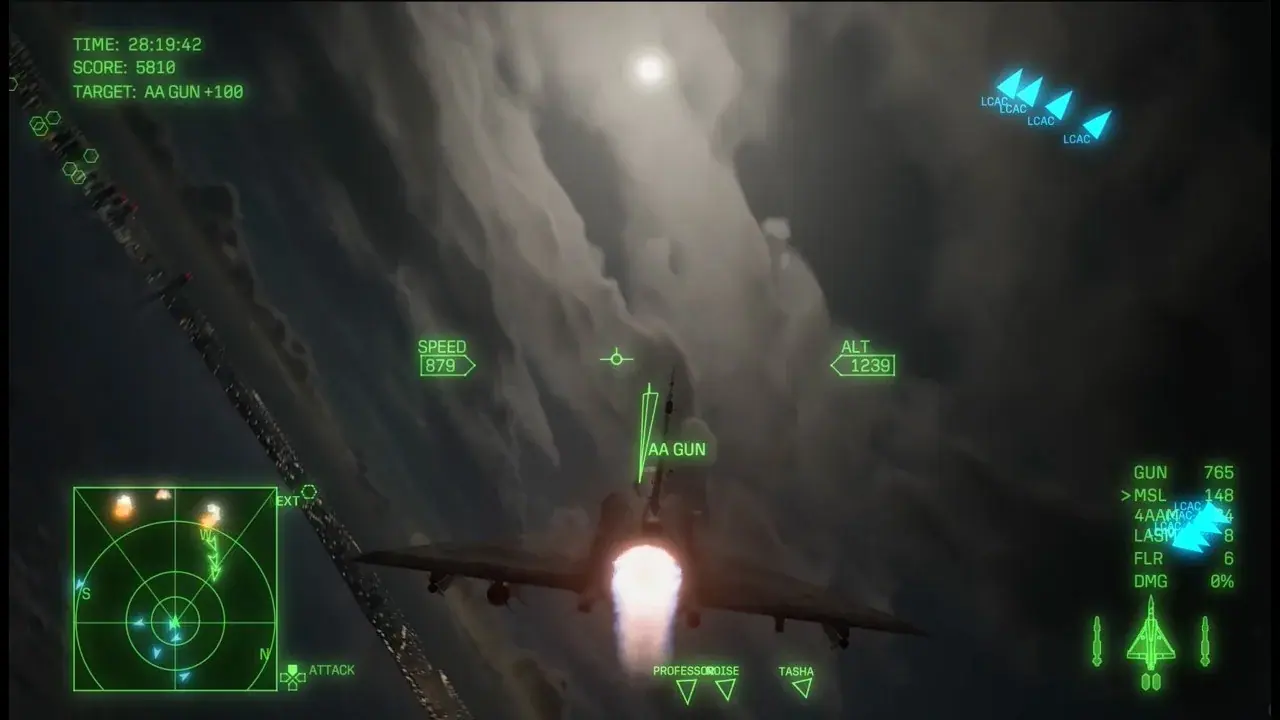
The HUD presents multiple contacts, target information, and battlefield alerts to prioritize during combat.
Higher difficulty rewards preparation because pressure leaves less time to improvise. Before moving up, build a repeatable mission routine:
- Read the briefing for the objective and expected target types before selecting the loadout.
- Choose special weapons for the mission rather than only for personal familiarity.
- Use parts with the mission’s likely damage and recovery demands in mind.
- Learn how your wingman commands affect the squadron instead of treating allies as background action.
- Keep enough attention on warnings, altitude, and positioning to avoid preventable damage while pursuing targets.
- Prioritize targets that directly threaten the objective or prevent you from acting safely.
- Use mission replay to refine an approach after you know where your first plan broke down.
Veteran specifically makes loadout decisions more important because damage recovery can depend heavily on that setup. Elite goes further by demanding strong battlefield understanding and efficient target priority. In both cases, preparation should reduce the number of decisions you must invent under pressure.
The simplest progression is to begin on Pilot, use Rookie or collision assistance when learning becomes blocked, move to Veteran after the fundamentals are dependable, and reserve Elite for missions you can already read and plan. Because difficulty remains changeable, choose the setting that helps you improve now rather than the label you think you should be able to complete.
Ace difficulty after the campaign
Ace is an additional difficulty for post-campaign challenges. It is separate from the four starting choices described above. The post-launch S-rank walkthrough reports that completing the campaign on Elite unlocks Ace, so check the unlocked difficulty menu after finishing that run. The Ace of Aces objective requires S ranks across the campaign on Ace; an Elite clear alone does not complete it.
If Ace is absent from a fresh save, do not assume the four starting settings are the complete difficulty system. Choose a manageable first campaign, develop a dependable hangar, then complete Elite when you are ready to pursue the Ace unlock. Free Mission allows rank cleanup on difficulties you have unlocked, so an individual missed S rank can be revisited after the campaign rather than forcing an immediate new full run.
Keep unlock progress and performance goals separate. Finishing Elite opens the reported route to Ace; earning S ranks on Ace is the later challenge. Confirm the unlocked setting and achievement progress in your own save before beginning a long cleanup session.